
How Does an ATS Panel Work?
Description: An ATS panel is a specialized electrical enclosure equipped with a motorized transfer switch that connects the output to one of two input sources: Generator or Mains. A neutral position disconnects the output entirely. The motorized transfer switch is paired with an advanced ATS controller, featuring a front-panel access port for a manual override lever that bypasses all electrical and electronic circuits.The panel also integrates essential protection and auxiliary components.
Curious to look inside? Here is our proposal
Buy the ATS Panel Wiring Diagram PDF 4,90€
ATS Systems: Certified, Plug-and-Play Reliability

Never fear a power outage again. Discover our professional, certified ATS panels for seamless automatic power transfer. With 40 years of expertise, we provide high-performance solutions for residential and industrial needs. Our Automatic Transfer Switch panels, paired with the BeK3 AMF / ATS controller, feature extraordinary load and generator protection against:
Over/Under Voltages
Over/Under Frequency
Overload / Overcurrent
Phase Sequence mismatch
Reverse Power
Alternator Failure
Not mentioning a granual protection of the engine with traditional I/O methods or J1939 compliant Canbus and the flexibility of our remote control & monitoring options.
What is an ATS panel?
Bernini Design clears up all misunderstandings once and for all with a "solid rock" technical approach
An ATS (Automatic Transfer Switch) is an electrical switch with three distinct states: [1], [0], and [2]. For each state, the ATS connects a common output [C] to a specific input. The [0] position serves a critical mechanical purpose: it ensures a physical break, preventing any electrical connection between input [1] and input [2].

The position of the switch is driven by mechanical levers coupled to a powerful electric motor. Automatic operation is only possible when this mechanism is paired with an electronic controller. Typical applications include electrical panels designed to connect a load to a primary power source (the mains, or position [1]) or an emergency source (a generator, or position [2]). Despite the simplicity of this technical definition, there are many misconceptions regarding ATS devices in standby applications—particularly when integrated into AMF (Automatic Mains Failure) systems. This guide resolves those issues:
ATS Control Panels: the "When"
It is crystal clear that you need an ATS panel when building a standby system based on a diesel generator.

An ATS panel is the correct choice when your power needs exceed 60kVA in a 3-phase configuration. You can choose a standard ATS panel or ask for a tailored version. When it comes to residential applications, unless you need 200 Amps of current, the best solution is to trust in the Bernini Design AMF Single-Phase residential control panels. Choose the right product on this page:
Single Phase Residential Panels
ATS Control Panels Complete Tutorial
An Automatic Transfer Switch (ATS) control panel is the core component of a standby power system. It looks like a distribution electric panel, but it additionally features an ATS controller on the panel's door that controls all functions.
The inside includes a "Motorised Transfer Switch" and various electrical components.
The ATS control panel monitors your primary power source (Mains) and automatically switches your building's load to a secondary source (Generator) during a power failure. This guide explains how it works, the technology behind it, and essential safety considerations.
Tutorial Links Summary:
The Risks of Basic/DIY Systems
The Solution: The ATS Control Panel
Power Connections Diagram
How an Automatic Transfer Switch Works
Source Monitoring: The ATS controller constantly monitors the Mains voltage.
Automatic Switching: When the Mains fail, the controller signals the generator to start. Once the generator is stable, the ATS transfers the load.
The "Break-Before-Make" Concept: To protect inductive/capacitive loads (like motors), the switch stays in a neutral 'zero' position for a programmable time (usually 2 seconds). This ensures no overlap between power sources, preventing backfeeding.
Contactor vs.Motorised Transfer Switches: the following table summarises what is about. A generator control panel that features a contactor-based solution is correctly identified with the term "AMF Control Panel" instead of "ATS Control Panel".
| Feature | Contactor-Based | Motorised Switch |
| Ideal Current | Up to 100A | Up to 2000A+ |
| Power Consumption | Constant (coil active) | When Switching |
| Mechanism | 2 Contactors
Electrical interlock |
Motorised
spring/gear |
| Best For | Smaller residential | Industrial/
High-power |
The common misunderstanding: "ATS Switch"
Often incorrectly referred to as an "ATS switch" (Automatic Transfer Switch; a redundant term), an ATS is a 3-position transfer switch (TS) driven by an automatic control system. When properly wired and enclosed in a suitable box with the necessary ancillary components, it allows you to transition your building’s power source between the utility mains and an emergency generator.
In other words, it ensures seamless, automatic power continuity during outages.
A 250 Amp motorised switch example

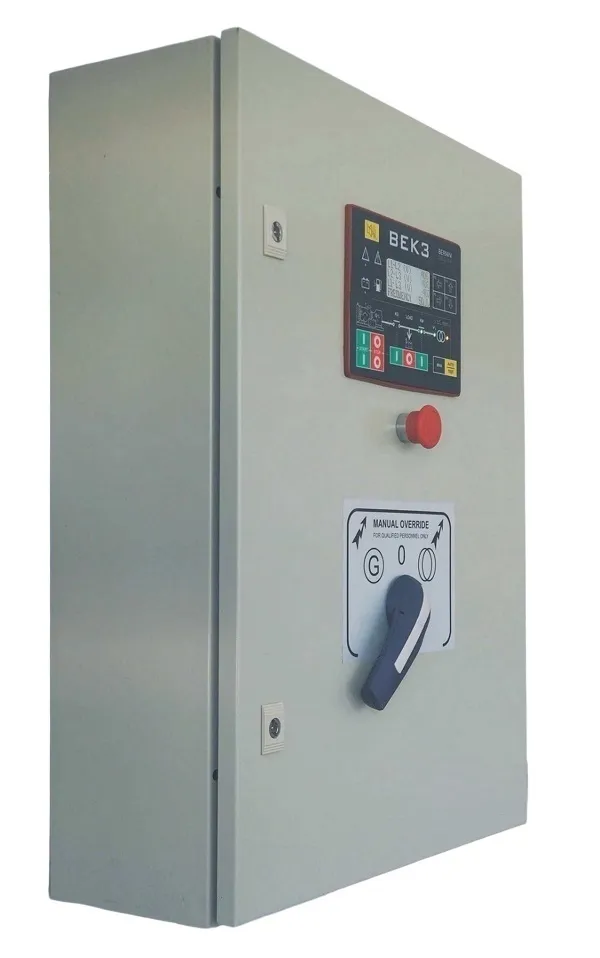
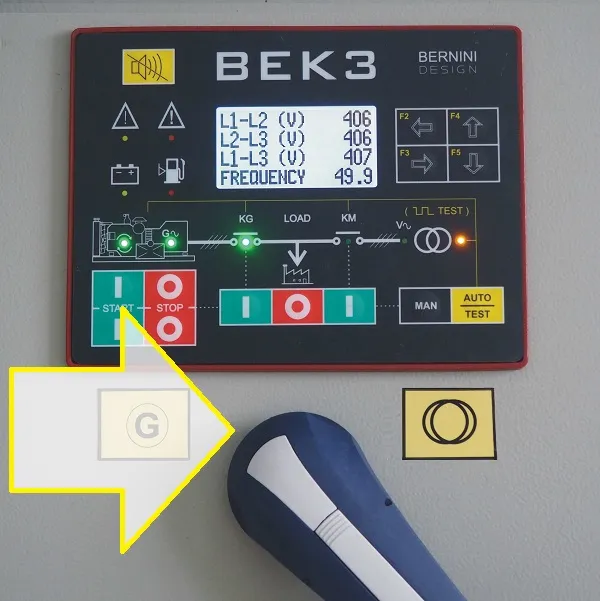
On the door of the ATS control panel is the ATS controller and, in the case of an emergency, the manual lever to override the TS (Transfer Switch).
ATS Control Panel Manual Override Lever


What is a Changeover?
Grammatically, a "changeover" refers to a complete transition from one system or condition to another. In the industry, it is commonly used to describe an AMF configuration utilising two contactors with mechanical and electrical interlocks.
A CONTACTOR-BASED CHANGEOVER

These ensure that only one contactor is active at a time: one connects the mains to the load, while the other connects the generator to the load. Both share a common output point: your facility. The contactor-based changeover panels are better defined as "AMF Control Panel".
Learn how a contactor-based changeover actually works
Buy the ATS Panel Wiring Diagram PDF 4,90€
The Risks: Why Basic TS, ATS, and Changeovers Fail
Attempting to build a system from individual components often leads to failure and safety risks:
1-Complexity and Risk:
A basic Transfer Switch (TS) is an industrial component with 3 positions (0-1-2). It is intended for use only by professional panel manufacturers, not for DIY installation.
2-Incomplete Solutions:
An ATS is simply a piece of hardware. Without specialised external components and complex engineering, it cannot function as a complete backup system.
3-Lack of User Control:
Most standalone ATS units lack user-friendly manual overrides and present significant challenges when interfacing with standard "electric-start" generators.
4-Safety Hazards:
Manual override operations on basic units often expose users to high-voltage electrical hazards.
5-Regulatory Compliance:
Without professional integration, you cannot achieve an "up-to-code" installation. In the event of an electrical fault or fire, you may face significant legal and insurance liabilities.
6-The Solution:
The ATS Control Panel is safe, compliant, and a reliable solution. We build professional ATS Control Panels, custom-manufactured to your specific power requirements.
7-Tailored Capacity:
We provide solutions ranging from 80kVA up to 200kVA with a 3-Phase + Neutral (3Ph+N) configuration.
8 Bullet Points For Purching a Bernini Besign ATS Control Panel
1- Turnkey Compliance: Every unit is supplied with full international certifications.
2- Universal Compatibility: Powered by the Bernini Design Be242RB universal interface board, any qualified electrician can integrate virtually any generator type.
3- Certified Safety: Because our panels meet strict standards, your electrician can certify the installation as "up-to-code," ensuring you are 100% protected in the event of an inspection or insurance claim.
4- Precision Control: Our user-friendly controller features over 50 customizable settings, allowing you to fine-tune automation without compromising system integrity.
5- Safe Manual Override: Operate your system safely from the exterior of the panel—no exposure to live electrical hazards.
6- Advanced Monitoring: Optional GSM, TCP/IP, and Modbus tools provide real-time status updates and alerts wherever you are.
7-Custom Configuration: We offer granular load control and protection by utilising high-quality contactors instead of standard, off-the-shelf Transfer Switches.
8- The Bernini Design 24/7/365 Support: Benefit from our global technical support, ensuring you are never left without assistance.
Safety and Legal Compliance
Installing an ATS involves high-voltage power. For legal compliance and safety, always hire a qualified electrician. Proper installation requires current-limiting devices, appropriate cable sizing, and adherence to international standards like IEC 61439. Improper installation risks fire, injury, and legal liability.
A good installation of an ATS control panel will provide safety and long-term functionality ot your backup power system.
ATS: The Technical Design
Circuit Protection:
Always use 10A circuit breakers for auxiliary control circuits wired inside the Automatic Transfer Switch panel.
Engine Interface:
The ATS controller acts as a universal bridge for engine auto-start modules. Use pilot relays to protect controller outputs.
Design Philosophy:
Measure twice, cut once. Always bench-test your automation logic with lamps before connecting the main building load.
The Controller:
The installation of the Be242 ATS controller is a mandatory choice for all Bernini Design ATS control panels.
System implementation example: industrial ATS panel
To demonstrate the concepts above, let’s look at a typical professional setup using a high-performance Motorised Transfer Switch paired with an advanced ATS Controller.


ATS Panel Core Components List
Logic Controller: Advanced ATS Controller (e.g., Be242).
Switching Device: 250A Motorised Transfer Switch (e.g., Telergon CCF/1 3PH+N).
Auxiliary Protection: 10A Circuit Breakers (MCB/GCB) for control circuits and 1A fuse for the motor.
Operation Logic Neutral Position [0]: The system uses an electric pulse of 12V to ensure the switch enters the neutral position before changing sources.
Mains/Generator Selection: A pulse on the [M] terminal drives the switch to the MAINS position. A pulse on the [G] terminal drives it to the GENERATOR position.
Safety Timing: The controller automatically enforces a 2-second "dead time" during every transfer. This is the Break-Before-Make rule in action, protecting your load from inductive back-EMF.
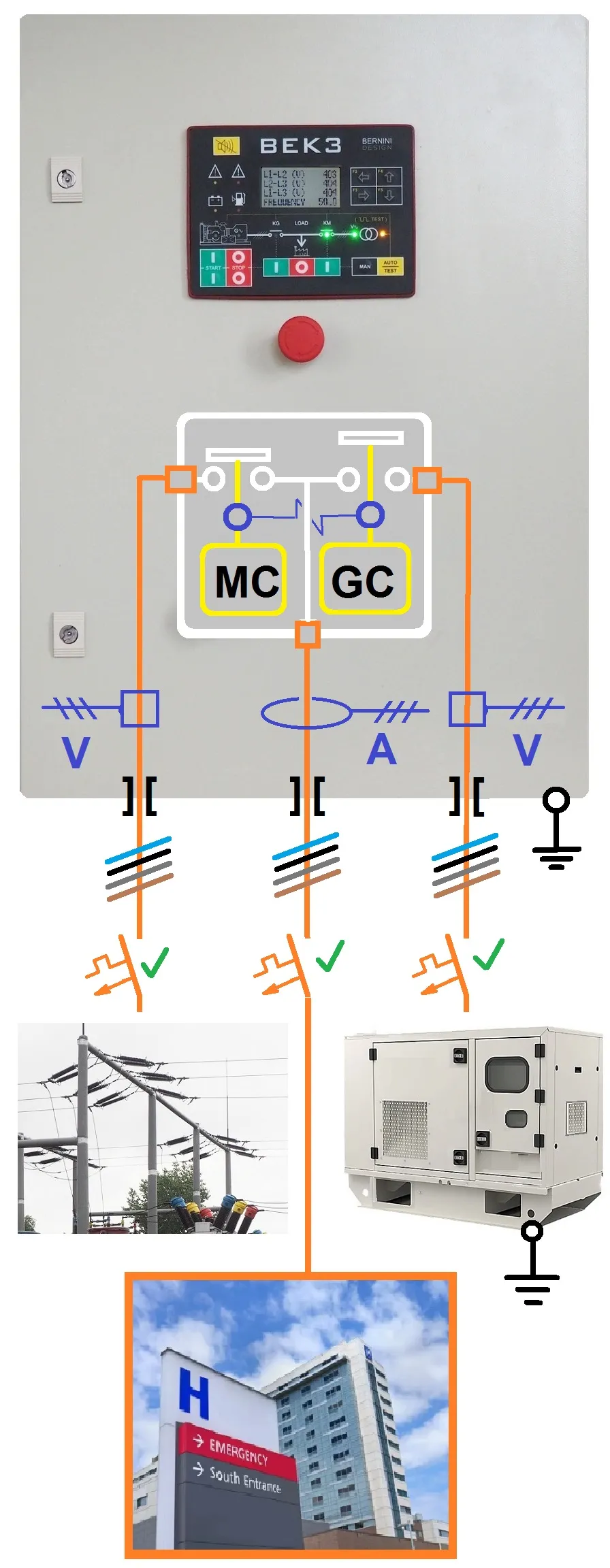
Typical ATS Panel Connection
Typical ATS panel connection
ATS control panel specifications
Before installing an automatic transfer switch in your standby power system, make sure that your product m
| Description | Notes |
| Manufacturer - Production Date | ernini Design Srl -........ |
| Model-ATS (Serial No.) | 60 kVA - BEK3 (Nr....) |
| Structure / Protection | Steel 1,5mm IP62 |
| External Dimensions | 70 X50 X26 / 25KG |
| Rated Power | 80 kVA @ 35°C |
| Continuous Rated Power | 60 kVA @ 35°C |
| Rated Voltage | 400 V / 360-440 |
| Insulation Voltage | 1000 V |
| Rated Current AC1 | 125 A |
| Continuous Current / Short Circuit | 0-100 A @ 400 V /50 kA |
| Frequency / Range | 50 Hz / 45-55 Hz |
| Electrical Protections | Min-Max V-Hz, Max Amp |
| Changeover | 3-Ph+N TELERGON 125A |
| Norms / Standards | IEC 61439-1-2-34-5-6-7 IEC 60529 |
| Internal Protections | 2 x Circuit Breakers 10 A |
| Humidity Class | 5-85 % |
| Operating Temperatures | -5 /+35 °C Nominal (50°C max.) |
| Temperature-Dependent Power Reduction | Reduce power by 5% for each °C above 35. |
| Connections | 12 X 25 mmq |
| Battery Charger | 12 V / 2 A |
| Standby Power Supply | 10 VA |
1) The panel must be installed only by qualified personnel.
2) Electrical protection devices must be installed to limit the power and current flowing through the panel, from the mains or generator, to a maximum of 100 A at 400 V.
3) Neutral and ground connections are mandatory.
4) The negative battery terminal must be grounded on the engine side.
5) Do not open the door when mains or generator voltage is present. The panel's interior contains components that present a risk of direct contact (IP00).
6) Consider placing advice about the presence of a standby generator
The Auto Mode
Activation: Push the [AUTO] button until the yellow LED illuminates.
Automatic Start & Transfer: The engine starts automatically when the panel detects a mains failure. The transfer switch disconnects the [LOAD] after the [MAINS BREAKER] timing expires. After the [WARM UP] time, if voltage and frequency are within configured settings, the transfer switch moves to the "GENERATOR" position.
Mains Restoration: When mains power is restored, the transfer switch moves to the neutral position for a programmed duration before connecting the mains.The engine stops automatically after a [ COOL DOWN ] time.
NFPA-110 Compliance Notes
If the engine shuts down due to an alarm, the transfer switch connects the mains independently of its status. If NFPA-110 mode is disabled in your settings, the transfer switch only transfers to the mains when its parameters are within safe limits. In AUTO mode, the BeK3 periodically tests the engine (if properly programmed), during which the yellow AUTO LED continues to blink. The BeK3 can also start and stop the engine via an activated remote control.
The Test Mode
Activation: Press and hold the [AUTO] push button until the yellow LED blinks. The panel will initiate a start sequence.
Operation: The engine will keep running until you exit TEST mode.
Exiting: Press the [AUTO] button briefly or select the OFF mode.
The Manual Mode
Starting the Engine: Push the [MAN] button to select MAN mode. Press and hold the [START] button until the engine
starts. The display automatically loads the ENGINE STATUS PAGE to show start-sequence information. (Note: During
cranking, the BeK3 turns off the display backlight to conserve battery voltage).
Generator & Load Transfer: Wait for the green engine LED to turn on. Wait until the green generator LED turns on. Push the [ I KG ] push button to activate the transfer switch and load the generator.
Mains Transfer: Wait for the green mains-available light to turn on. Push the [ I KM] push button. The transfer switch enables the mains after a 2-second changeover delay. (Note: The programmable changeover delay timer only functions in AUTO mode). Stopping the Engine: Push the [0-STOP] button. The [STOPPING] message will be displayed.If the engine has already stopped, you can reset the stop sequence by pressing the [0-STOP] button again.
The Off Mode
Turning OFF: Press and hold the [ 0-STOP ] button for 2–3 seconds to turn OFF the BeK3 and clear the fault alarms log. Parameter Programming: In this mode, you can program parameters or modify settings. Turning Back On: Push the [ MAN ] or [ AUTO-TEST ] button on the front panel to turn the controller back on.
The Setup Mode
Default Configuration: The BeK3 controller features default settings for a 400V 3-phase system and
standard I/O engine controls. On-Site Programming: You can program the controller directly on-site without external
equipment. The panel accepts single-phase or three-phase systems for both utility power and the generator. Follow the
instructions detailed in the installation manual to proceed.
There are two separate layers of connections: the automation power layer and the "power" layer. The automation layer must be implemented first. The main goal is to connect the engine and perform all tests on it. After that, you can approach the second layer: the connection of the Load, generator, and the mains. The following picture cleraly illustrate the 400 V connections. To dive into the engine connection details, visit the tutorial page:
ATS PANEL CONNECTIONS TUTORIAL

Up-To-Code Standby ATS Panel Installation
Our ATS panels are tested 100% before delivery. You must rely on a licensed electrician capable of providing an "up-to-code" installation. You can benefit from our support 24-7-365.
The installation must be carried out by a qualified electrician. He will release the certificate in force in your country. A bad installation may cause backfeeding, that is the most dangerous situation when dealing with standby power installation.
The ATS control panel, in a standby backup power system, is connected between the utility power and your building. It is also connected to the generator. A control panel made by Bernini Design offers additional connections for remote control, monitoring and most importantl, the connection to the engine. In other words, the ATS control panel is capable of starting and stopping the generator when necessary. The installation must be carried out by a qualified electrician. At the end of its job, he weill release an Up-To-Code installation certificate. For a complte undersyour clarity, follow this 3-step overview.
Step one: Understanding the ATS control panel environment
In this picture, we present a general overview. The simplest case is interfacing with a power generator that features its own auto-start electronic module.

In this case, connect the ATS control panel's "FUEL SOLENOID OUTPUT" to the auto start module's "REMOTE START INPUT".
Maintain a high level of insulation of the low-voltage wiring from the mains. In case of extreme overvoltage during a thunderstorm, the parasitic capacitance can couple the overvoltage with the generator. This will cause severe damage to electronic parts like the voltage regulator, engine automation systems or auto-start modules.
A good practice of keeping low-voltage wires and high-voltage wires very well separated will provide long-term safety.
Step two: the right connection
Even though the ATS panel is designed to prevent backfeeding, you must wire all connections with caution, especially in a 3-phase system with neutral. This prevents fatal damage in the first place. You must wire the mains input to the utility power, the generator to the generator input and the load to the ATS control panel output. It is a mandatory practice to maintain the same phase sequence. This will avoid electric motors rotating in the opposite direction when switching from mains to generator and vice versa. Even in the case of a single-phase system, you must respect the phase and neutral connection. Some equipment strictly requires a precise LINE and NEUTRAL connection. In some cases, you must create a virtual NEUTRAL by using a resistive impedance.
Step three: connection recap
Before setting your system in the automatic mode of operation, make sure of the following
1- Limiting the current device on the mains supply according to the maximum ATS switch rating.
2- Limiting the current device on the mains supply according to the maximum ATS switch rating.
3- The size of the cables is in accordance with the rated current.
4- The terminal blocks are properly tightened.
5- Full insulation test between load-generator-mains.
6- The generator is capable of supplying the current needed in the worst-case scenario.
7- Double-check if the installation is up-to-code.
8- Check the protection settings of the ATS controller.
9- Check the mains failure settings on the ATS controller.
10- Put warning indicators about the presence of an automatic backup generator.
11- Carry out a full manual test of the system.
Last but not least, double-check the environments around the backup generator: it must meet the manufacturer's specifications.
MECHANICAL INSTALLATION
To install an ATS control panel, you must find a suitable place for it. It must be fixed to a stable and robust wall. The total weight can reach 40kg. In this case, you have to drill 4 holes of 10mm diameter minimum. Use metallic wall fixing plugs. If the wall is made of concrete and subject to thermal variation, consider to use 5mm-thick spacers to allow a good air flow over the back surface of the box. This prevents condensation and fungus proliferation inside the metallic cabinet. There is no problem for ATS control panels over 160kVA being assembled into heavy racks suitable for floor mounting. In either case, you must provide good protection against rain and elements,far away from direct sunlight.
PROTECTION AGAINST ELEMENTS
If the ATS panel is installed outdoor and exposed to marine environments, you must consider using a BeK3-based ATS panel. This ATS box features all gaskets based on silicone compounds preventing long term aging.
ELECTRICAL INSTALLATION
There are some basic electrical configuration to be considered:
-SINGLE PHASE ATS PANEL
-3 PHASE ATS PANEL
-ONE GENERATOR SERVING TWO OR MORE LOADS
-TWO GENERATORS SERVING ONE LOAD
There are two basic ways to connect the LOAD to UTILITY POWER or GENERATOR: via a contactor-changeover or a motorised changeover. The ATS panel wiring diagram varies by typology. On this page, we provide details for a 3-phase ATS panel wiring diagram based on contactors, a single-phase ATS wiring diagram based on contactors, and a 250-amp ATS panel with a motorised changeover.
ATS Panel Price List
The price of a 125 A (80 kVA) 3-phase, motorised changeover is 1.590 €. The price of a 3-phase, 100 A (60 kVA) contactor-changeover, AMF panel is 1.303 €.
Eliminate power-outage headaches with an ATS (motorised changeover) or AMF (Contactors based) panel. With a rugged manual override lever on the front door, you can bypass complications instantly.
Free shipping within Europe with a 5-year warranty certificate. A 5%-10%-15% discount is applied based on the quantity purchased. Place an order to
bernini@bernini-design.com
WA +40 721 241 361
Motorized-Switch Changeover Panels Price
| Power/Current | ATS Price | Size/wt. |
| 80 kVA
/125 A |
1.590
EUR |
70x50x26
26kg |
| 100 kVA
/150 A |
1.690
EUR |
70x50x26
27kg |
| 130 kVA
/200 A |
1.790
EUR |
70x50x26
28kg |
| 160 kVA
/250 A |
1.990
EUR |
70x50x26
30kg |
Detailed Internal Wiring Diagram
These ATS control panels are manufactured in Europe according to the IEC 61439-1-2-34-5-6-7 & IEC 60529 standards.
Typical ATS Panel Connection Example
Connect the three-phase and neutral lines. Inside the ATS control panel, the power cables are bolted directly to the transfer switch body.
See inside a 250 A motorised-switch ATS panel
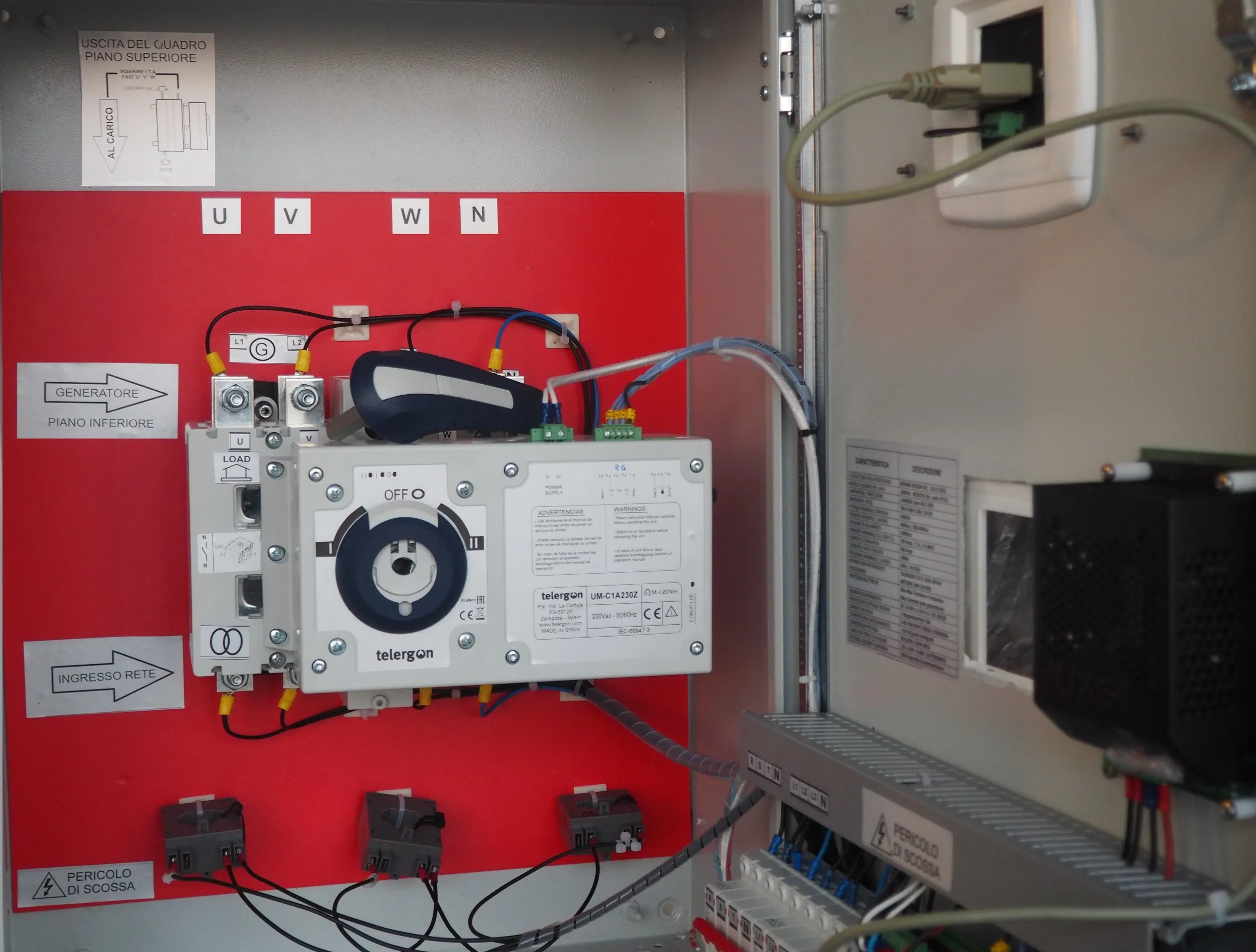
These ATS control panels will never let you down; insert the lever and directly choose your power source. Forget boring troubleshooting and dangerous electrical shortcuts—enjoy reliable, foolproof backup power.
"Contactors-Based" Changeover Panel Price
Benefit from the granular load protection provided by a contactors-changeover. The panel feature the user-friendly Be242 ATS controller.The correct term for panel that feaures a contactor changeoer is AMF panel.
Free shipping within Europe with a 5-year warranty certificate.
Contactor-Based Changeover Panels Price
| kVA/AC1 | AMF Price | cm | kg |
| 15/
32 A |
792
EUR |
50
40 25 |
14 |
| 25/
45 A |
877
EUR |
60
40 25 |
16 |
| 40/
63 A |
1.186
EUR |
70
50 25 |
22 |
| 60/
100 A |
1.303
EUR |
70
50 25 |
28 |
Buy online the 15 kVA and 25 kVA
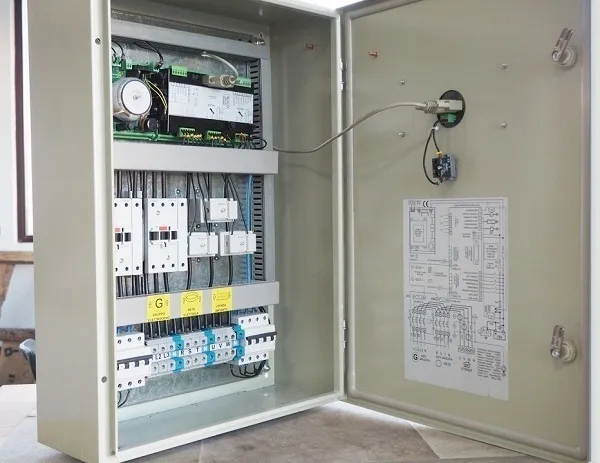
Detailed Internal Wiring Diagram Overview
A Typical "contactor-based" Panel Connection Example
The standard "contactor-based" changeover panels features suitable terminal blocks. Custom made versioins above 100 A require direct connections on the body of the contactors.
Single-Phase ATS Panel Price List (Residential Generator)
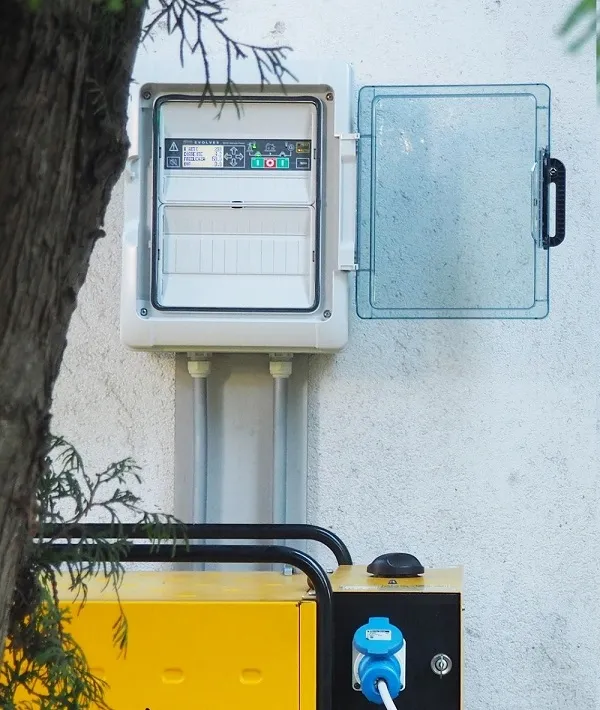
Switch your mindset to a combined Bernini design single-phase standby generator control panel: get unprecedent appliances protection.
Single-Phase Automatic Mains Failure Panels Price List: Free shipping within Europe with a 5-year warranty certificate.
Single-Phase 5 kW-10 kW Panels price
| Power kW
Current AC1 |
Price
EUR |
Size/
wt. |
| 5 kW (*)/32 A
(Conect) |
349
EUR |
32x24x14
3 kg |
| 10 kW (*)/50 A
(Evolve) |
799
EUR |
34x43x16
7 kg |
| 10 kW (^)/50 A
(Be242) |
899
EUR |
50x40x20
12 kg |
(^) Metal box / (*) Plastic Box
Read more About Residential Standby Generator Solutions
Solar System Orion ATS Panel Price: 399€
Solar (FV) Single-Phase 5 kW Panels Price
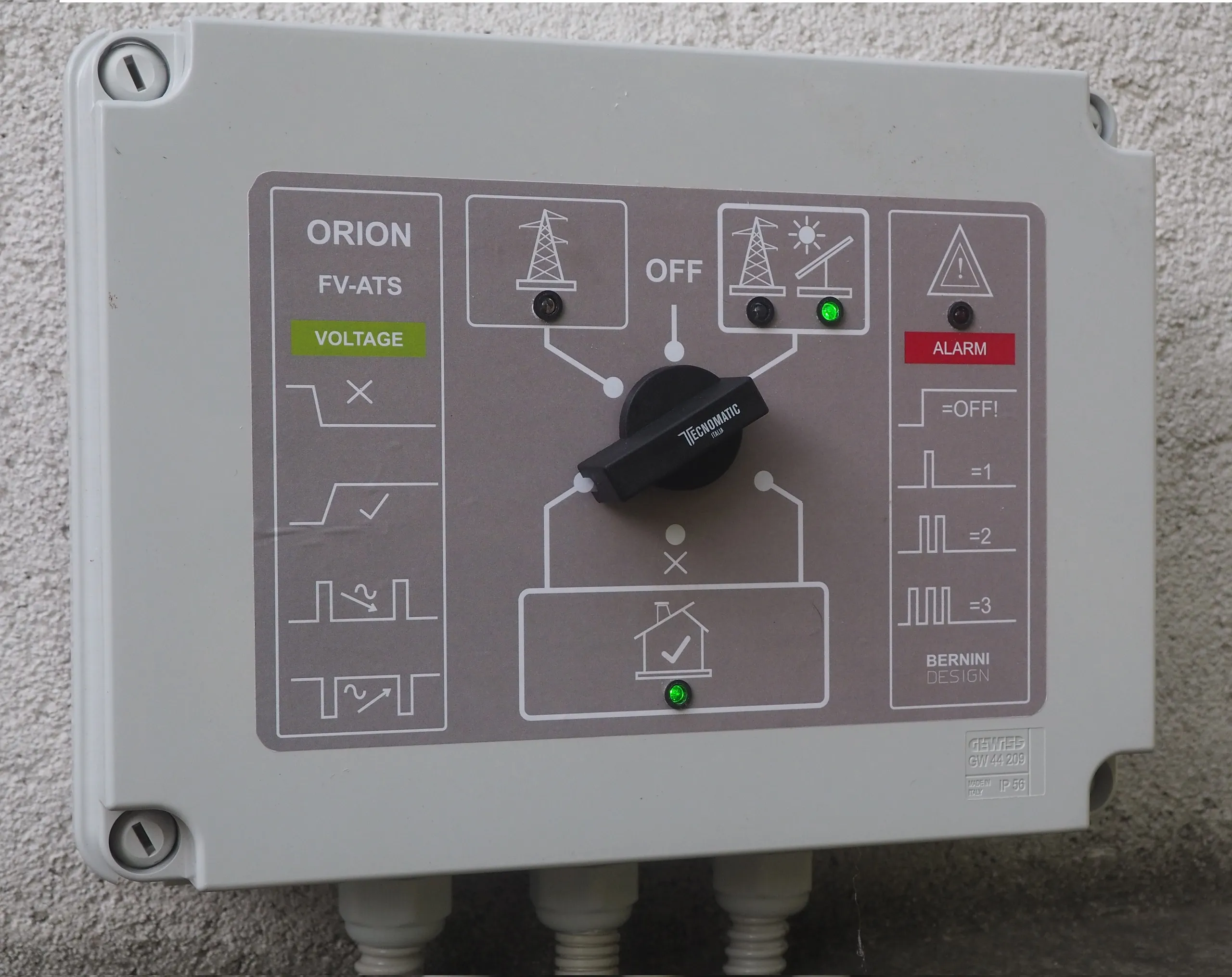
Protect your appliances from damaging power transitions. While normal cycling is part of an appliance's daily operation, the uncontrolled switching found in many standard ATS units ignores back EMF. This constant strain is a hidden killer that will inevitably cause your appliances to fail prematurely
Product Specifications & Online Purchase
Bernini Design Srl
AMF Panel Full Form
AMF Panel Full Form: the essential gateway that, via a contactor-based changeover, protects your load and control the generator in case of a power outage.
Bernini Design provides this technical guide to eliminate the widespread confusion regarding AMF panels, ATS units, and generator controllers.
AMF Panel Full Form Price List
AMF Panel: Access Premium Engineering Directly
Bernini Design Srl is committed to delivering high-performance power management technology worldwide.
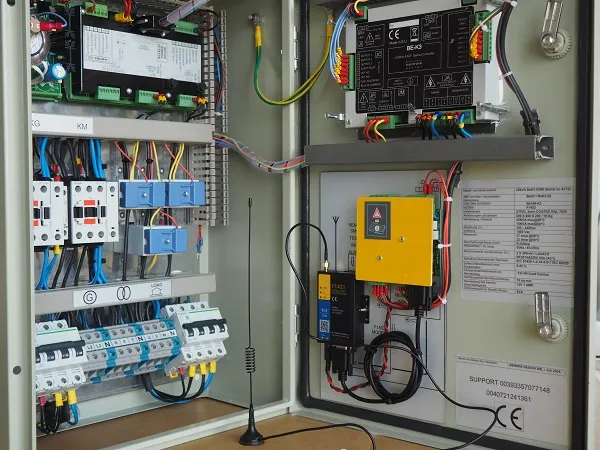
This platform allows you to purchase AMF panels directly from the manufacturer, tailored to your specific power requirements. With over 40 years of industry experience, we prioritize end-user satisfaction above all else.
AMF Panel Full Form Typical Connection
We recommend that you insert suitable circuit breakers to limit the current through the panel. This will prevent severe damages to your wires in case of a direct short-circuit. Amf panles up to 100 A features terminal blocks.
How does a contactor-based changeover work?
How to get the most from an AMF Panel?
Why install an AMF panel?
An AMF panel is a backup standby system for electrical gateway equipment, responsible for routing utility or generator power to your building according to your requirements.
An AMF control panel relies on a contactor-changeover solution, which is fundamentally different from a motorized changeover switch.
Enlarge to full size: 10 kW Single-Phase AMF Panel
By installing an AMF panel, you achieve a much higher level of load protection granularity—a critical advantage in telecom, data center, and medical applications.
The mechanism operates entirely on logic: the contactors open and close directly according to the AMF controller commands. In contrast, a motorized changeover can sometimes remain in a closed position even after the controller issues an open command, simply because motorized switches require AC power to operate. If utility power returns (even with out-of-limit voltage fluctuations), a motorized switch can expose your load to dangerous voltage spikes because the motor takes at least 500 ms to open.
This issue does not exist with a contactor-based AMF panel. The contactor remains safely open by default and will only close after the AMF controller fully validates the incoming voltage.
Learn more about the differences between AMF and ATS panels on the following page:
When to install an AMF panel?
An AMF panel is a backup standby system for "GATEWAY" electrical equipment. It is committed to connecting the generator or utility power to your building according to your needs. Install an AMF panel with a power generator of up to 60kVA. An AMF panel. If paired with a high-tech AMF controller, offers extraordinary benefits for load protection. It overcomes all typical "gaps" of the ATS panel. The most common underestimate issue is about the motorized transfer switch: in some cases it stucks in a closed position until a suitable source of power is capable of moving the motor. In other words, install an AMF panel when you load is critical: hospitals, telecom shelters, data centers and security systems. AMF panels over 50kVA are expensive. When it comes to high current, over 200 amps, is preferable to install a basic ATS panel paired with an AMF panel capable of serving the only critical loads.
AMF Panel Features Remote Control Monitoring
This is an example of 40kVA AMF panel that features full remote GSM monitoring. Using your mobile phone, you can directly control the assignement of the load to Mains or Generator.
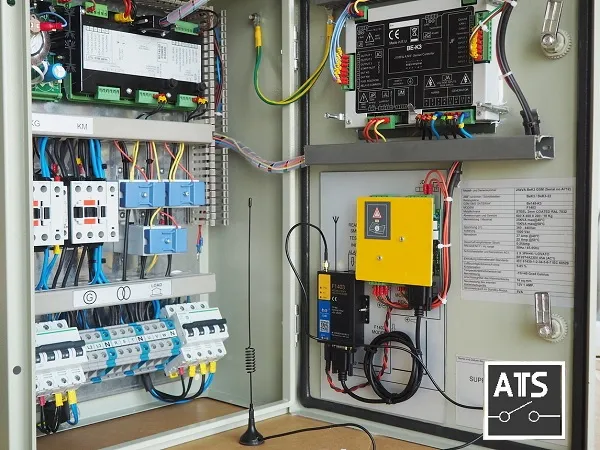
You will receive 100% feedback of each operation. The BeK3 features an RS485 ports that support the Modbus Protocol up to 1000m. You can connect an RS-485-USB converter of RS-485-TCP/IP server.
Is an AMF panel different from an ATS panel?
There are differences in the controller point of view and power rating as well. Install an ATS panel when you require power above 60kVA. An AMF panel is based on contactor changeover technology.
Find out more about AMF wiring diagram with contactors (4,90€)
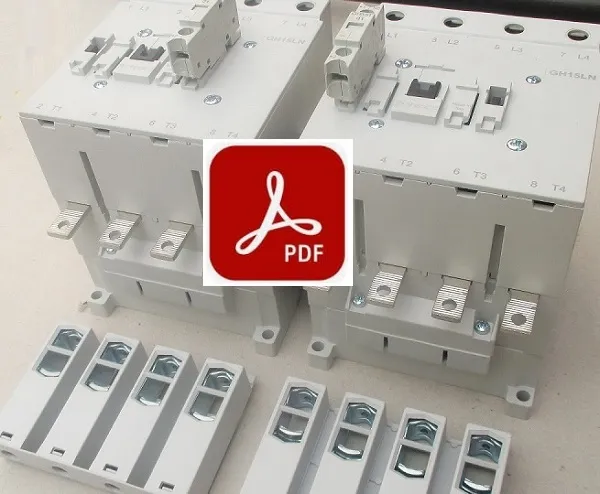
This will enable you to control the load and monitor the mains correctly. The drawback is the continuous power requirements of about 20W to hold the contactor in a closed position. But it is largely compensated by the benefit you get in a long-term.
Contactors offer tremendous flexibility in operation. The MOTORIZED SWITCH has a longer response time compared with a CONTACOR-BASED version. When power is absent, the CONTACTOR version will isolate the LOAD. An MOTORIZED SWITCH-based AMF panel can maintain continuity on the LOAD. This could be a source of problems.
AMF Panel Full Form Price List
A Rational AMF Configuration
This a typical 40kVA AMF panel made by Bernini Design SRL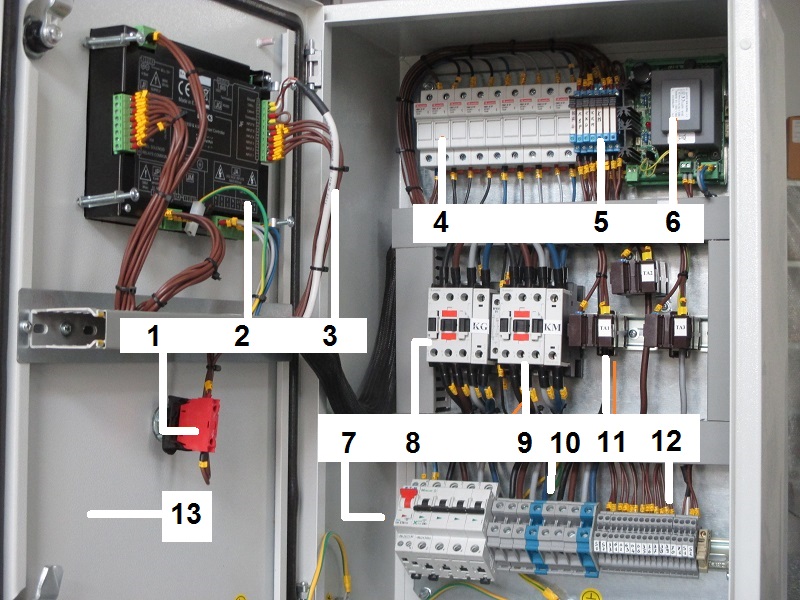
[1] Emergency stop button [2] Mains and generator measurement connections [3] CANBUS and MODBUS [4] Fuses [5] Output relays [6] Battery charger [7] Circuit breakers [8] Mains Contactor [9] Generator Contactor with mechanical interlock [10] Terminal Blocks. [11] Current transformers [12] Input-output terminal block.
Why to purchase a Bernini Design AMF panel?
Bernini Design SRL manufactured the first compact AMF controller in 1988. In terms of AMF technology, it has been a turning point. Hundreds of businesses have attempted to imitate our technology ever since. With more than 600.000 systems in use globally, Bernini Design SRL technology is the industry leader in AMF panels used in critical applications.
A Bernini Design AMF panel feature a "unique" universal engine interface. This means that it does not matter what kind of engine is installed in your diesel generator. The electrician will easily install the panel on-site.
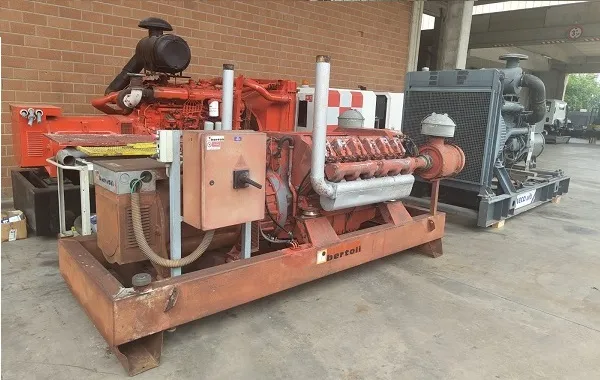
You can tell your electrician to open the wiring diagram tutorial page. They will instantly understand what it's about.
The long-term reliability
AMF AFTER 12 YEARS OF SERVICE DAY AND NIGHT ON THE SEASIDE
Believe it or not, after 12 years of continuous service day and night on A BEACH RESORT, the 40kVA AMF panel is perfectly functional. The customer contacted us to replace the metal cabinet!
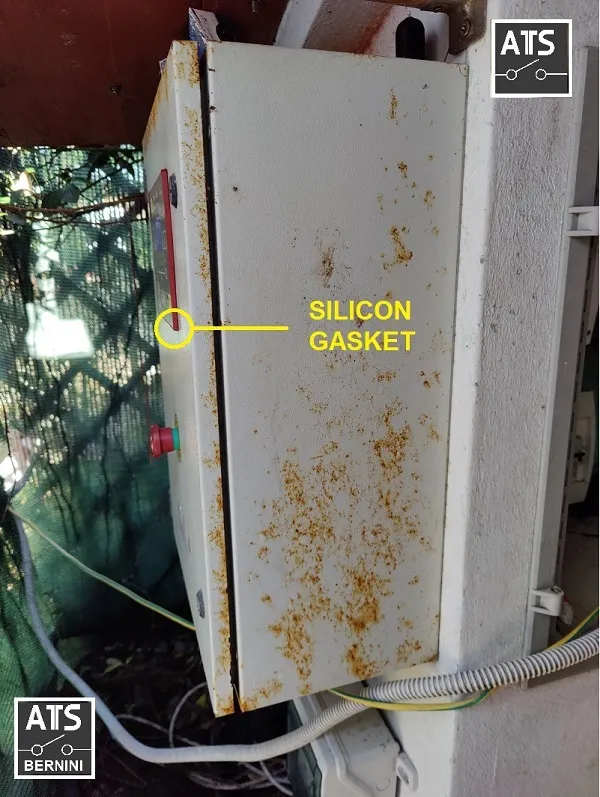
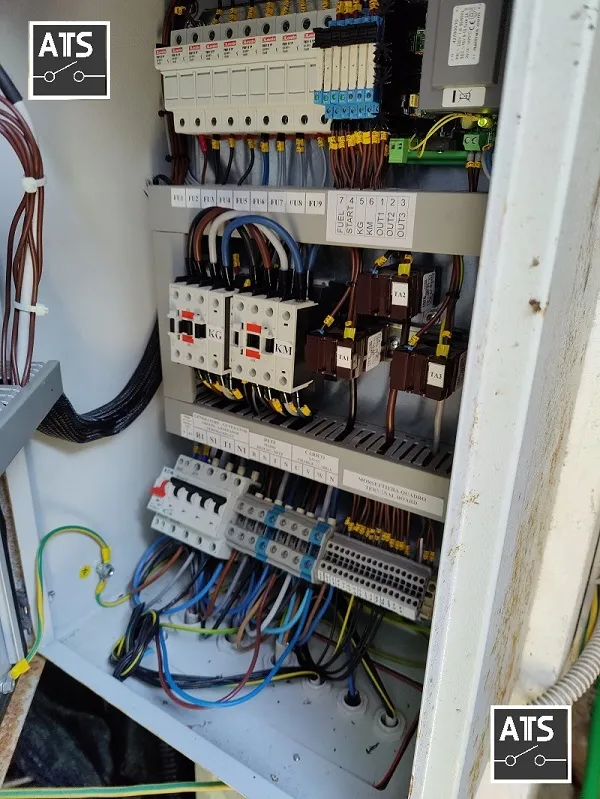
Thanks to the silicon gasket, which features an IP65 rating, the internal parts of the panel are unaffected by the elements.
There is no evidence of rust on the inside.
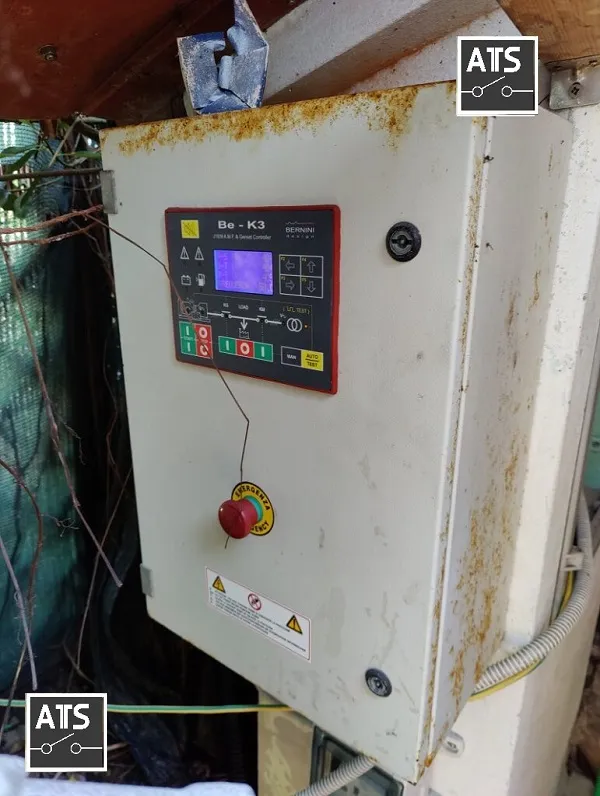
THE PANEL AFTER 12 YEARS OF SALINE ENVIRONMENT EXPOSURE
To avoid this problem, a fibre-glass enclosure should be used when a panel works in saline marine environments. Regular maintenance with special coating must be periodically carried out.
THE PANEL AFTER 12 YEARS OF SALINE ENVIRONMENT EXPOSURE
What are the AMF panels' typical ratings?
From a minimum of 15 KVA up to 60 KVA, three-phase with or without neutral connection. When purchasing an Automatic Mains Failure panel, consider a safety margin of 20% by choosing one that has the biggest power: utility power or generator. AMF panels for single-phase operation are also available on request. The typical operation is in telecom shelters in remote locations.
Electrical specifications example for the 60kVA-400V AMF panel
| Description | Notes |
| Manufacturer - Production Date | Bernini Desing SRL -............ |
| Model-AMF (Serial No.) | 60 kVA - BeK3 (Nr. serie......) |
| Structure / Protection | Steel 1,5mm IP62 |
| External Dimensions | 700 X500 X260 / 32kg |
| Maximum Rated Power | 78 kVA @ 35°C |
| Continuous Rated Power | 60 kVA @ 35°C |
| Rated Voltage | 400 V / 360-440 V |
| Insulation Voltage | 1000 V |
| Rated Current AC1 | 115 A |
| Continuous Current / Short Circuit | 0-86 A @ 400 V /50 kA |
| Frequency / Range | 50 Hz / 45-55 Hz |
| Electrical Protections | Min-Max V-Hz, Max Amp |
| Changeover | 2 X contactor BF80T4A |
| Norms / Standards | IEC 61439-1-2-34-5-6-7 IEC 60529 |
| Internal Protections | 2 x Circuit Breakers 10 A 4-pole |
| Humidity Class | 5-85 % |
| Operating Temperatures | -5 °C/+35 °C Nominal (50°C max.) |
| Temperature-Dependent Power Reduction | Reduce the power by 5% for each degree °C above 35 °C. |
| Connections | 12X35 mmq terminal block |
| Battery Charger | 12 V / 2 A |
| Standby Power Supply | 20 VA |
1) The panel must be installed only by qualified personnel.
2) Electrical protection devices must be installed to limit the power and current flowing through the panel, from the mains or generator, to a maximum of 115 amps at 400 volts.
3) Neutral and ground connections are mandatory.
4) The negative battery terminal must be grounded on the engine side.
5) Do not open the door when mains or generator voltage is present. The panel's interior contains components that present a risk of direct contact (IP00).
6) Consider placing advice about the presence of a standby generator
AMF Panels International Standards Compliance
The Bernini Design AMF panels comply with multiple standards. First of all, the AMF panel is electrical equipment featuring several kinds of hazards. It complies with IEC61439, UL508, IEC60364, IEC62305, IEC61643, and 61557. You can find more details on the official IEC site:
On the other hand, the AMF panels deal with engines and generators. You should take important advice from ISO8528. From the automation point of view, the AMF panel is a key part of a standby system. In other words, it must comply with NFPA110, NFPA99 and c/CSA-M89. You can get more info by visiting this site
Not to mention that particular regulations might be in force in the country where the AMF panel installation is made.
AMF Panel Features Overview
5-Output with 80 settings
6-Input with 25 settings
200-Event log with RTC
Up to 600 Vac 3-Phase monitoring
Up to 1.000 Aac 3-Phase monitoring
Earth-Fault monitoring
Reverse Power protection
Over 100 adjustable
User-friendly control panel
User-friendly LCD navigation
Engine & Generator Instruments
CAanbus J1938 Modbus-RTU
How does a Bernini Design AMF panel increase the long-term reliability of your power generator?
First, we do not use standard AMF controllers DSE, Comap, Datakom or others. We are not limited by generator manufacturers' economic boundaries. We use the components we need, no matter what. Our job is focsed on an end-user satisfaction.
Our AMF controller is not made of plastic: it is not a "toy"
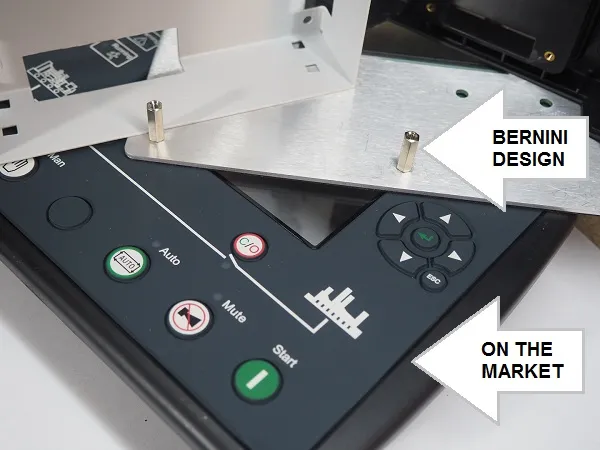
Second: you must follow our advice for a state-of-the-art installation.
All, and always, is about money. To save money, you install the controller on the generator. This is a bad idea.
Of course, it is a good idea for people who do business with the service. However, our goal is different. We believe it is a serious solution. We believe that the final customer deserves safety.
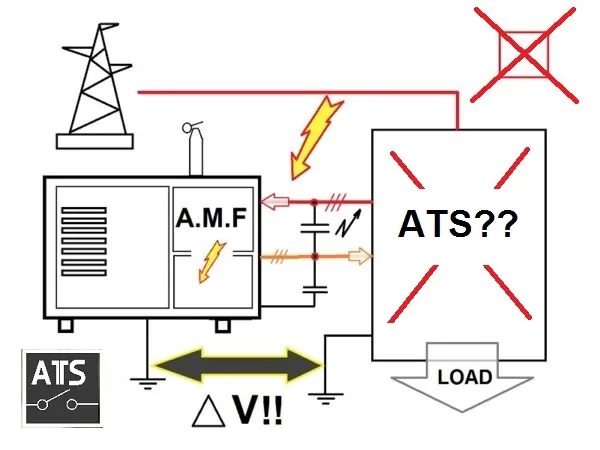
In the schematic above, the overvoltages can easily damage the generator. No matter the insulation you can reasonably provide. The stray capacitance of the connection will win. Yes, you can find cheap AMF panels. But this is not a professional solution at all. The following picture presents one of the optimal solutions.
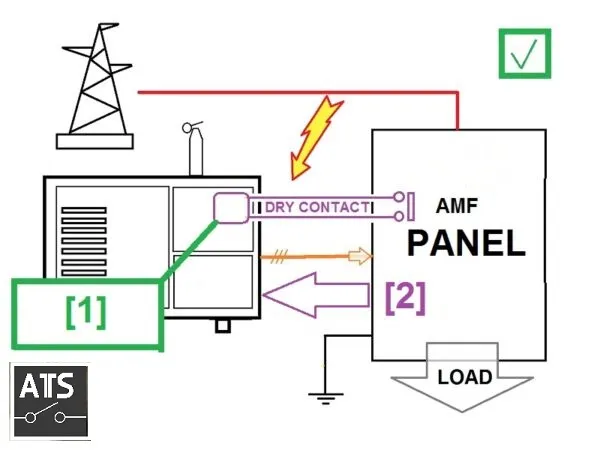
In the drawing, you can observe that the AMF panel prevents overvoltages from reaching the generator. The controller can start the engine via an auto-start module installed on the generator [1] or the configurable input-output line [2]. Both solutions are more than acceptable.
Bernini Design Srl
Industrial Area, 46035 Ostiglia
Italy
+39 335 70 77 148
bernini@bernini-design.com
Buy a Single-Phase ATS Panel for Your Backup Generator
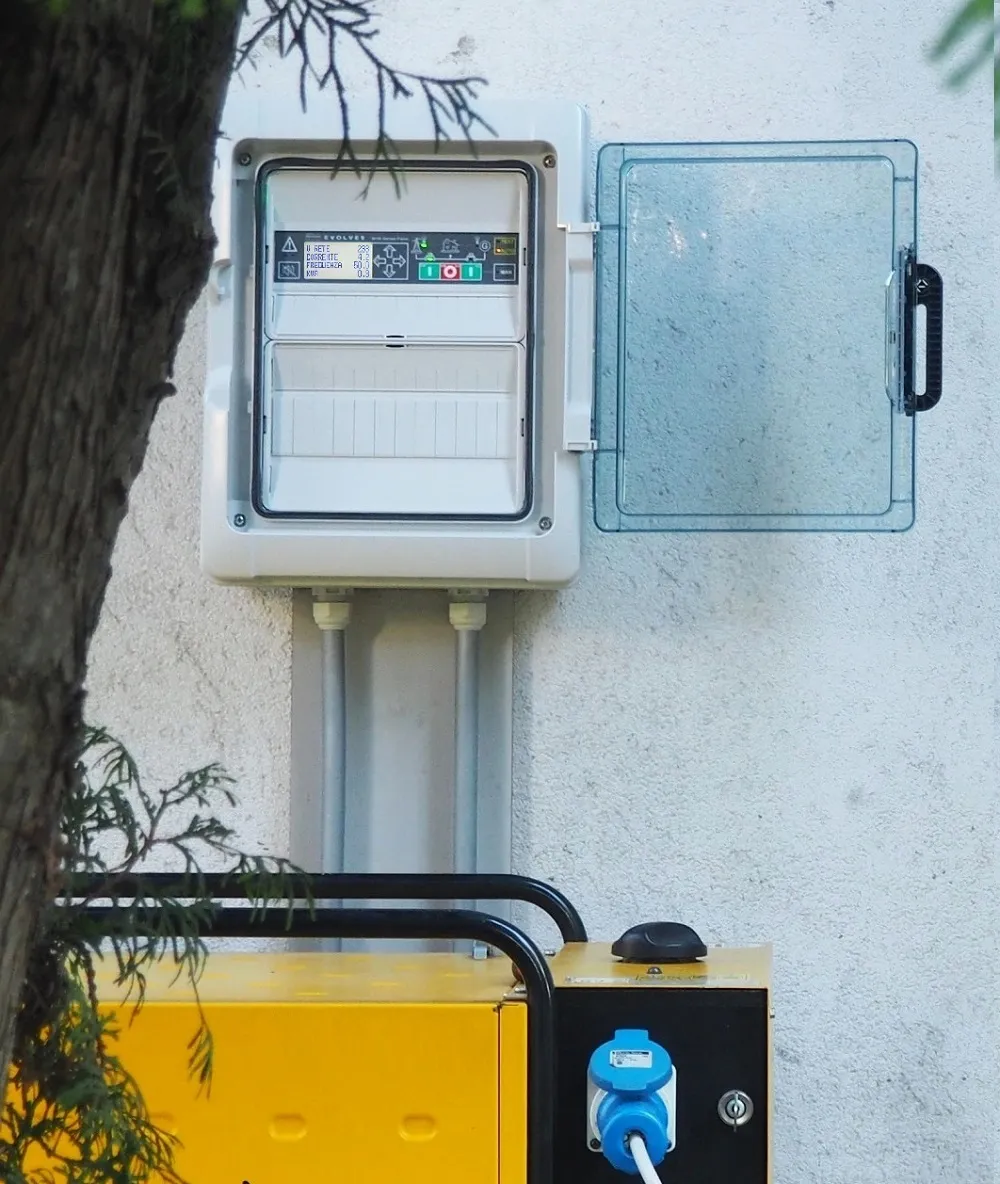
You must ignore all unsafe and miscellaneous practices you may find on the internet. For safety and code compliance, only a qualified electrician can install a suitable and certified electric panel designed for this task. . Proper integration into your main breaker box is the only method to prevent hazardous backfeeding into the utility grid. Follow our tutorial.
Who Are We?
Bernini Design manufactures professional-grade, single-phase standby generator control panels designed for home generators. Built with 40 years of European engineering excellence, our solutions offer an intelligent alternative to so-called standard ATS panels.
Quick Guide: Finding Your Solution
Discover the load management issues you're likely facing:
Discover the load management issues you're likely facing:
Bernini Design ATS Bernefits :
Portable or Power Statioin up to 5kW:
Stationaly Generator up to 10kW:
Why not use a standard ATS panel for household use?
Motorized transfer technology is the foundation of a standard ATS (Automatic Transfer Switch) panel. However, it is often inappropriate for residential applications for the following reasons:
1) Insufficient Torque: If the mains voltage drops consistently rather than failing completely, the switch may remain closed. 2) The electric motor: often lacks the torque required to force the switch open under these unstable conditions.
3) Lack of Switching Control: You are forced to wait for the secondary source to sequence the opening of the mains and the closing of the secondary circuit.
4) Uncontrolled "Dead Period": The interval between switching power sources is fixed. You cannot adjust this timing unless you invest in high-end, expensive industrial-grade devices.
5) Limited Configuration: Creating an effective standby system requires fine-tuning at least ten distinct electrical parameters and time delays—most standard ATS panels do not offer the user-level control needed to tailor these settings to a home environment.
The ATS "Worst Case" Scenario: The AMF Trap
Often, when a consumer requests an ATS panel, they are sold an AMF (Automatic Mains Failure) panel instead, which relies on a contactor-based changeover. While this may seem functionally sound on paper, it presents significant risks for a homeowner:
1) Mechanical Fatigue: The contactor coil must operate continuously, day and night, to hold the circuit closed. Eventually, this coil will fail.
2) Dependency: When the coil fails, you are left without power. Because these units are not user-serviceable, you are forced to call an electrician for a repair just to restore basic electricity to your home.
3) Hidden Energy Costs: Because the contactor coil is energized 24/7, it consumes power constantly. For a small home, an AMF panel can consume at least 10Wh continuously—a "vampire" load that adds unnecessary cost to your monthly electricity bill.
Benefits in installing the Bernini Design panels
Switching between the grid and the generator—and vice versa—is performed by mechanically interlocked contactors featuring a neutral position. In the event of a power failure, the contactors open the circuit.
This pause allows any electric motors found in air conditioners, fans, and refrigerators to come to a complete stop.
Standard ATS panels on the market lack this important feature and cause serious damage to appliances. A Bernini Design transfer panel features a manual switch that overrides any electronic function.
With four decades of specialized experience, we have curated three core products that cover every residential standby requirement. Select your power range below, or contact us for a fully customized architecture.
The Conect 5 kW ATS Panel (32 A)
Cost-effective & reliable solution for your house
Engineered for simplicity and long-term durability. The Conect 5kW ATS panel provides seamless automatic power management for your home standby generator. This universal Automatic Transfer Switch is engineered by Bernini Design for the safe integration of stationary or portable generators and power stations into residential electrical systems. The Conect 5kW ATS panel combines the advantages of a contactor-based chageover, with a mechanical switch that overrides all automatic circuits.
Fully compliant with international standards and manufactured in Europe.
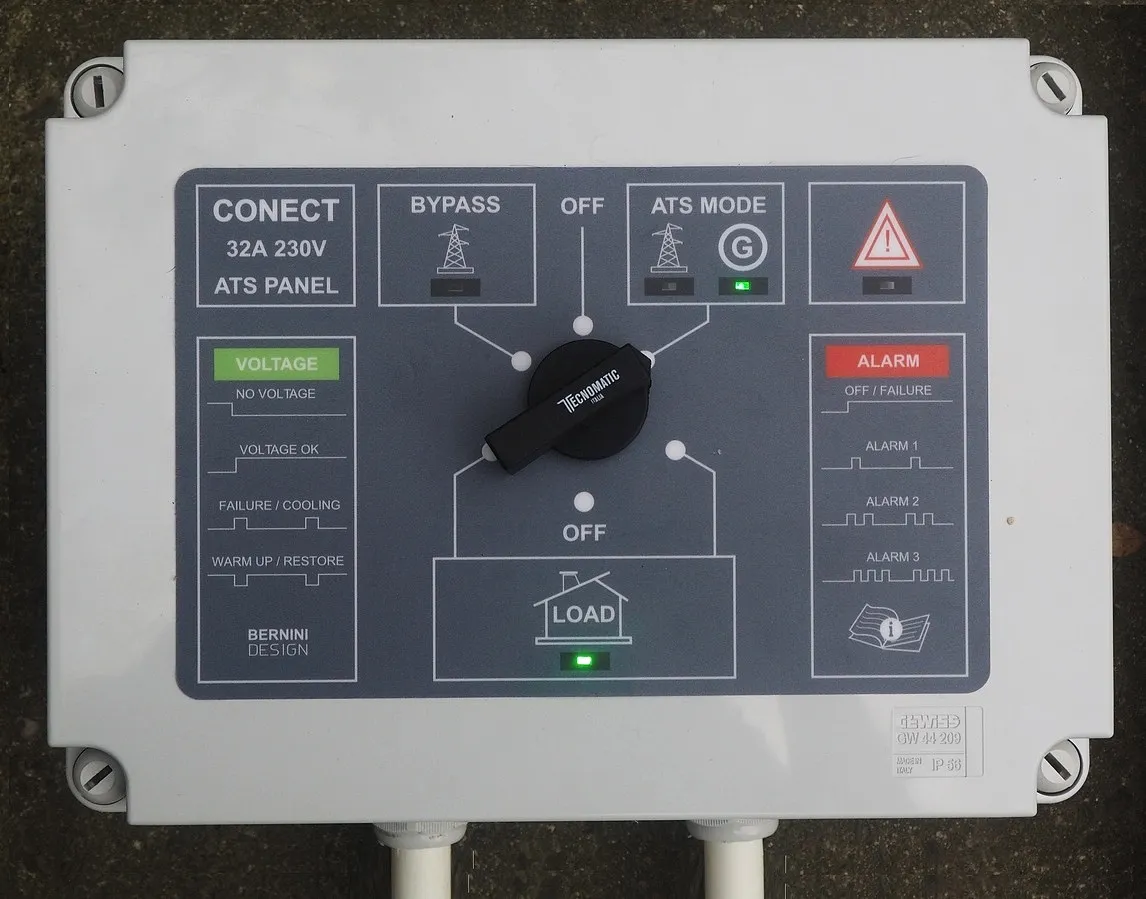
5 kW Single-Phase ATS panel Specifications
| Dimensions / Ingress Protection | 320mmx250mmx140mm / IP42 |
| Holes footprint | 250mm (base) 170mm (high) 4-hole |
| Weight | 3 kg |
| Relay Outputs | Positive Voltage (V batt) MAX 1A |
| Digital Inputs | Dry contacts, no voltage is allowed. |
| Load Maximum Peak Current (30 minutes) | 32 A - 230 V |
| Load Maximum Continuous Current | 25 A - 230 V |
| Recommended external circuit breaker protection rating | 25 A - 230 V |
| Internal ATS protection | 4 X SIOV S20K275 Varistors |
| Continuous Internal ATS rating | 25 A AC1 FUSE 32 A 10X38 |
| 12V Battery Charger | 12.8 V 0,5A |
| Mains nominal voltage | 210 V-250 V |
| Generator nominal voltage | 210 V-250 V |
| Frequency Range | 45 Hz - 56 Hz |
| Utility Power Short-Cuts detections | 500 ms |
| Utility Power Transient Filter | T3 5-15-30-45 sec, 1-2-3 mins |
| Mains Failure - Restore time | T2 5-15-30-45 sec, 1-2-3 mins |
| Warm-up Cooling-down time | T1 5-15-30-45 sec, 1-2-3 mins |
| Change-over technology | 2x4-pole contactors with mechanical interlock
(40 amp AC1) |
| Max cable size | 10 mmq |
| Norms compliance | EN61349X, 214/35/UE, CEI121-5, 2014/30/UE |
| Environmental Conditions | -10/+40 °C / 85% |
| Certification /Warranty | CE/5-year |
Connectable generator types
Electric-start generator sets, portable generators, photovoltaic systems, or battery power stations
Automatic starting is only possible if the generator engine is correctly connected; a portable generator requires manual starting. Similarly, a battery power station must also be activated manually.
Buy the Conect 5 kW Single-Phase ATS Panel
ATS Switch Installation Manual
349 €
5-YEAR WARRANTY
Delivery time is 10 days after purchase confirmation.
Functional Overview
The unit features a 3-position manual changeover switch: BYPASS, OFF, and AUTO.
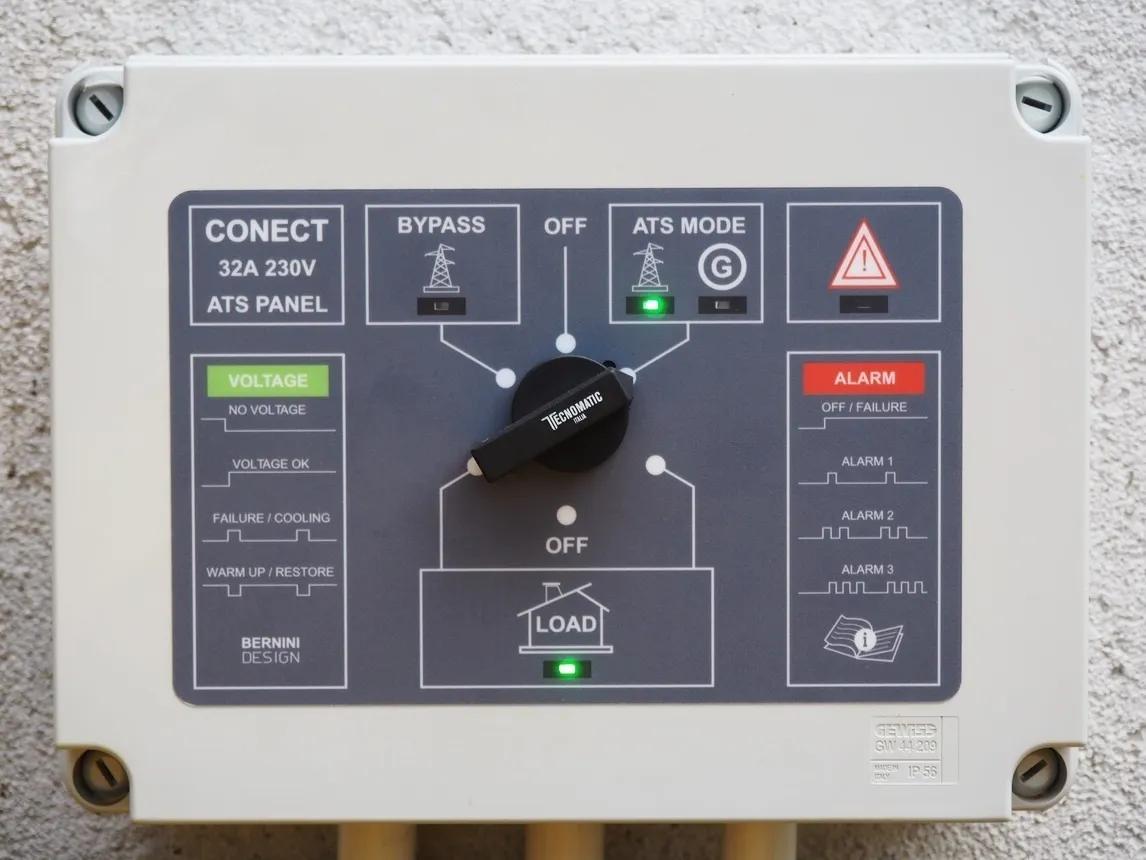
The BYPASS mode provides a mechanical override of all electronic circuits, connecting your house directly to utility power. Designed for decades of continuous operation, the system includes robust internal protection against utility-side over-voltage and electrical surges.
Using a Stationary Generator
When paired with a stationary generator, the system provides full automatic start/stop functionality, managing the power transition seamlessly upon utility failure.
Using a Portable Generator or a Power Station
The system accommodates portable generators for cost-effective emergency power.
Preparation: Set the panel to AUTO mode. Ensure non-critical loads (e.g., HVAC, laundry appliances) are disconnected to prevent generator overload.
Activation: Start the generator according to the manufacturer’s instructions and close the generator's circuit breaker.
Synchronization: Once the generator achieves stable voltage and frequency, the "G" indicator will light continuously. If parameters are out of limits, the indicator will blink, preventing transfer.
Load Transfer: Once verified, the panel automatically connects the generator to your home load.
Technical Integration Overview
The universal 3-relay configuration supports any engine type. If your generator utilizes a standard 3-pole or 5-pole ATS connector, we can supply the compatible interface cable for the most popular generators like Pramac and Hyundai.
Digital Inputs
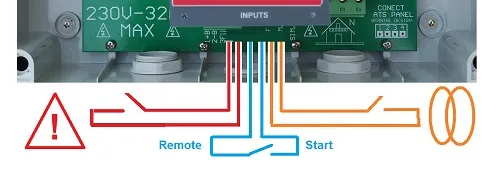
REMOTE START: Initiates engine start even while utility power is present.
STOP: Commands engine shutdown.
MAINS SIMULATED: Disables the generator during power failure events if required.
Digital Outputs
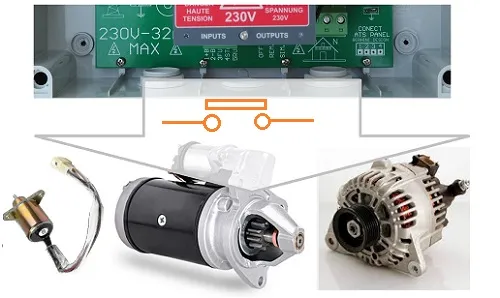
FUEL SOLENOID RELAY: the basic commandfor commencing a start cycle.
STARTER MOTOR: Commands engine shutdown.
Miscellaneous
ENGINE RUNNING STATUS FEEDBACK: when you connect an electric start generator, this analog input contributes to a safe crank termination.
BATTERY CONNECTION TERMINALS: you can maintain the supply of the ATS panel in case of mains or generator failure. The LED indicators help you deconding alarms. When mains is normally available,the ATS panels keeps the battery charged when mains is present.
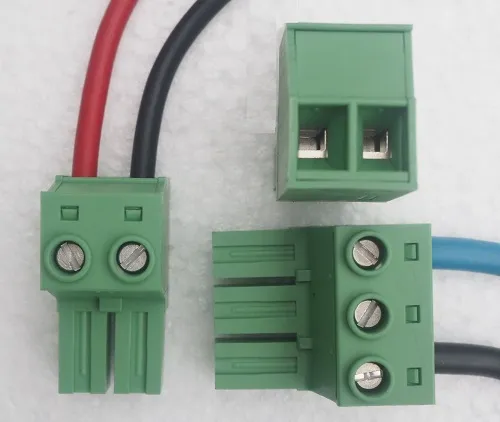
MAINS-GENERATOR-LOAD: the Conect 5kW ATS panel features Phoenix Contact removable terminal blocks that accept a wire range of wire sizes.
The Conect 5kW ATS panel is the ideal choice when you can not afford th cost of a fix generator. On request we can supply the connction Kit cable for Pramac and Hyundai generator.
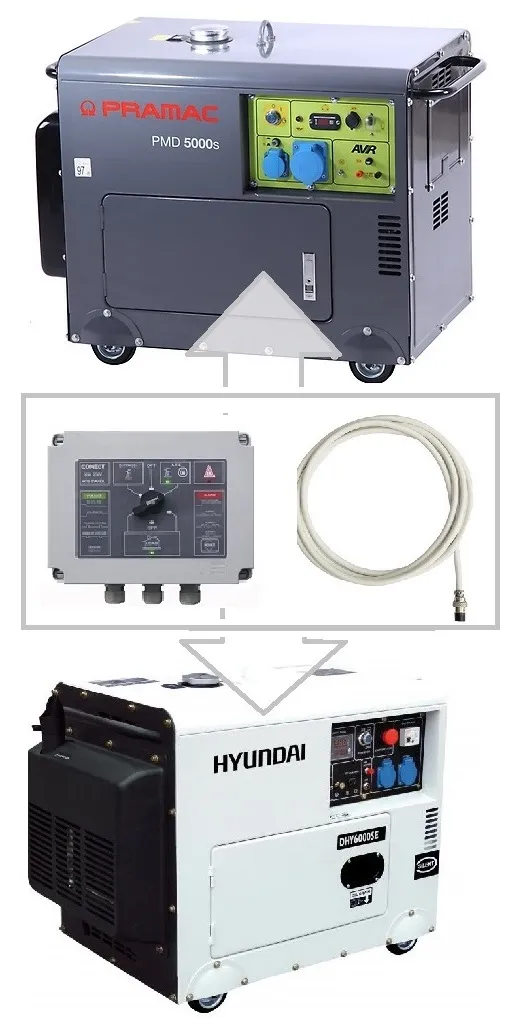
Pramac / Hyundai adapter cable
49€
5-YEAR WARRANTY
The Evolve 10 kW (50 A) ATS Panel
Experience the next generation of power management. Featuring our signature this ATS panel delivers industrial-grade automation and total protection for your residential power architecture maintaining a user-friendly interface.
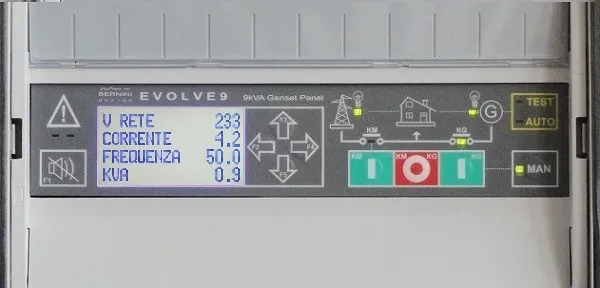
The Internal Bypass Switch Will Never Let You Down!
The Evolve 10kW ATS panel features an interanl 3-position, 50 A, mechanical switch: "Bypass"(left), "Off"(centre) and "Auto"(right). Normally, keep it in the "Auto" mode. Switch to off to disable any source of power. In case you do no longer need the automatic mode , choose the "Bypass" position: the switch overrides your panel and connects your house directly to the mains.
Wiring Diagram
Thanks to the programmable input/outputs, you can connect any kind of engine. You can purchase an old generator or a second-hand generator with or without an embedded auto start module.
The changeover is built with two interlocked contactors. To avoids overvoltages and overcurrent that can potentially damage your appliances, a programmable dead time is included on each transition. You can set up over/under voltage, frequency, and overload protections. Not to mention the wide range of settings for control and monitoring of the engine, auxiliary alarms and fuel. Despite the Be242 10kW ATS panel is supplied with "default settings", you can set up the controller at will.
Evolve 10 kW ATS Panel Electrical Specifications
| Description | Notes |
| Manufacturer - Production Date | Bernini Design Srl -..... |
| Model / Serial No. | Evolve 10 kW (Serial Nr...) |
| Structure / Protection | Polycarbonate IP62 |
| External Dimensions | 34X43X16 / 7 kg |
| Maximum Rated Power | 11 kVA @ 35°C |
| Continuous Rated Power | 10 kVA @ 40°C |
| Rated Voltage | 230 V / 360-440 V |
| Insulation Voltage | 1000 V |
| Rated Current AC1 | 50 A |
| Continuous Duty Current at 40°C | 44 A @ 230 V |
| Frequency / Range | 50 Hz / 45-55 Hz |
| Electrical Protections | Min-Max V-Hz, Max Amp |
| Changeover | 2 X Ghisalba GH15E |
| Norms / Standards | IEC 61439-1-2-34-5-6-7 IEC 60529 |
| Internal Protections | 3 Fuses 5x20 2 A |
| Humidity Class | 5-85 % |
| Operating Temperatures | -5/+40 °C Nominal |
| Temperature-Dependent Power Reduction | Reduce the power by 5% for each degree °C above 35 °C. |
| Connections | UT25 Terminal Blocks |
| Battery Charger | 12 V / 1 A |
| Standby Power Supply | 10 VA |
1) The panel must be installed only by qualified personnel.
2) Electrical protection devices must be installed to limit the power and current flowing through the panel, from the mains or generator, to a maximum of 63 amps at 230 volts.
3) Neutral and ground connections are mandatory.
4) The negative battery terminal must be grounded on the engine side.
5) Do not open the door when mains or generator voltage is present. The panel's interior contains components that present a risk of direct contact (IP00).
6) Consider placing advice about the presence of a standby generator
Purchase the Evolve 10 kW ATS panel
799€
5-Year Warranty
Delivery time is 20 days after purchase confirmation.
Free Shipping to the EU
Bernini Design Srl
Bernini Design Srl